
Locked Out of Your Own Website? Here's How to Get Back In.
Key Takeaways
- Map what you own: search old emails and run your domain through ICANN Lookup.
- Email your develop first. A polite note with a deadline solves most of these.
- Recover the domain before anything else. It’s the key to everything.
- Recover hosting, or migrate to a fresh account you control.
- Reset your WordPress admin, then lock every account down in your name.
Every few months I get a version of the same phone call. A business owner, usually calm on the surface and panicking underneath, tells me their web person stopped answering. The site needs a change, or something broke, and there is no login, no password, no idea where the website even lives.
If that’s you right now: you are not careless, and you are not alone. Most small business websites get set up by one person who keeps all the keys, because at the time it was easier that way. It only becomes a problem the day that person disappears.
The good news: in most cases you can recover everything without a lawyer and without rebuilding from scratch. You just have to work the problem in the right order.
Before you start
Don’t assume bad intent yet. Developers get sick, change careers, and let businesses quietly wind down. The polite route in Step 2 resolves more of these situations than any technical trick on this page. Keep every message in writing.
First, understand what you're trying to get back
“My website” is really four separate things, usually held in four separate accounts. Knowing the difference is half the battle, because each one gets recovered a different way.
🌐
1. The Domain
Your address (yourbusiness.com). Held at a registrar like GoDaddy or Name.com. The single most important thing to own.
🗄️
2. The Hosting
The server your site’s files live on (Bluehost, SiteGround, WP Engine, and so on). Billed monthly or yearly.
🔑
3. The Website Admin (CMS)
Your WordPress login (or Squarespace, Wix, Shopify). This is what lets you edit pages and content.
✉️
4. Business Email
If your email runs through the same domain, it’s tied up in this too. One more reason the domain comes first.
The four keys to your website. Recover them in roughly this order.
"You Can't Fix A Website You Can't Get Into."
Find Out What You Actually Own
Before you send a single email, build a map. Two places to look:
- Your inbox. Search old email for terms like “welcome,” “invoice,” “renewal,” “GoDaddy,” “Bluehost,” and your domain name. Receipts and welcome emails tell you which companies are involved and, crucially, whether the accounts were opened in your name or your developer’s.
- The public record. Run your domain through the ICANN Lookup tool, the official registry lookup. It shows which registrar holds your domain and when it expires. Contact details are often hidden behind privacy services, but the registrar name alone tells you who to call.
Write down what you find: the registrar, the hosting company if you can identify it, and whose name each account appears to be in. Also note your domain’s expiration date. If it’s close, that’s your most urgent deadline, because an expired domain can eventually be scooped up by someone else.
Try the Polite Route First
Most “missing” developers aren’t hiding. They’re busy, burned out, or out of the business. A short, non-accusatory message with a clear deadline gets a response surprisingly often. Send it by email, and if you have a second channel (text, LinkedIn), use that too.
copy and Paste This
Hi [Name],
I hope you’re doing well. I need to take over management of [yourbusiness.com] and want to make that easy on both of us.
Could you send me the login details for the domain registrar, the hosting account, and the WordPress admin by [date, one week out]? If any accounts are registered in your name, I’d appreciate your help transferring them to mine. I’m happy to settle any outstanding balance first.
If I don’t hear back by [date], I’ll start account recovery directly with the registrar and host, so this is my attempt to sort it out together first. Thanks for the work you’ve put into the site.
[Your name]
Two things matter here: the deadline, and the paper trail. If you later have to prove ownership to a registrar, a host, or (worst case) a small claims court, a calm written record helps you. If you owe the developer money, expect to settle that. Holding a site over unpaid invoices is a real (and often legal) point of leverage.
Recover Your Domain
The domain is priority one. Own the domain and you can rebuild everything else around it. Lose the domain and even a perfect website is stranded.
If the domain account is in your name
You just need to get back into the registrar account. Use the “forgot password” flow with any email address the business has used. If that fails, call the registrar’s support line. Expect identity checks: billing details, the card used for renewal, or business documents.
If it's in your developer's name
You’ll need the developer to transfer it to you, which is another reason Step 2 comes first. If they respond, ask for a standard registrar transfer into an account you control. ICANN’s guide to transferring your domain name explains what that process looks like and what the registrar is required to do.
If they never respond, contact the registrar’s support team with your evidence: invoices showing you paid for the domain or the website, business registration documents, and your written attempts to reach the developer. Registrars deal with this scenario regularly. It’s slower, but it works more often than people expect.
Watch the Clock
Check the expiration date you found in Step 1. If the domain lapses while you’re sorting this out, renewal grace periods vary and redemption fees get expensive. If it’s within 60 days of expiring, tell the registrar that up front and ask what your options are.
Recover Your Hosting
Same logic, different company. If the hosting account is in your name, use password recovery or call support with your billing details. If it’s in the developer’s name, you have two paths:
- Transfer the account. Most hosts can move a site between accounts, or transfer billing and ownership, once both parties confirm or you provide proof of ownership.
- Move the site instead. Sometimes the cleanest fix is a fresh hosting account in your name and a migration of the site’s files and database into it. Once you control the domain, you can point it anywhere. You don’t have to win the old account back to win.
Either way, once you’re in: download a full backup immediately, before you change anything else. Files and database both.
Get Back Into WordPress
With hosting access in hand, the WordPress admin is very recoverable. In rough order of ease:
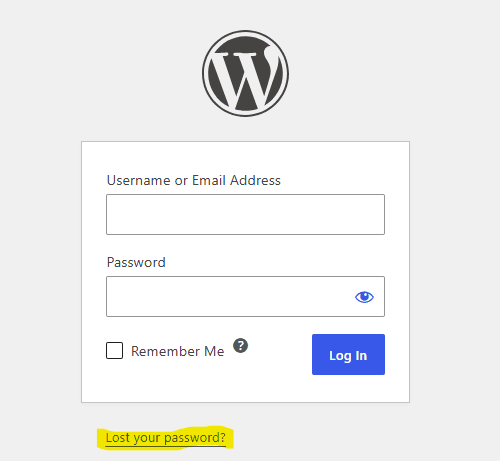
- The lost password link. Go to yourbusiness.com/wp-admin and click “Lost your password?” If any admin account uses an email you control, you’re done in two minutes.
- Your host’s tools. Many hosts (WP Engine, SiteGround, Bluehost, and others) offer a one-click WordPress admin login or a user management tool right in the hosting dashboard.
- The database route. Through phpMyAdmin in your hosting control panel, you can reset any admin password or create a new admin user. The official WordPress guide to resetting your password walks through every method, including this one. If that feels beyond you, any competent WordPress developer can do it in minutes.
Once you’re in, do three things before touching anything else: change every admin password, remove or demote accounts you don’t recognize, and confirm the admin email on your main account is one you own.
Not On WordPress?
The same order of operations applies on other platforms, with one difference: on Squarespace, Wix, and Shopify, the “hosting” and the “website admin” are the same account. Recover the domain first, then use the platform’s account recovery with any email the business has used. All three have support teams that handle ownership disputes and can transfer a site to a new owner with proof of ownership. Shopify store owners can also be recovered through the store’s billing details.
Lock It Down So This Never Happens Again
Once you’re back in, spend one more hour making sure you never have to read an article like this again.
Watch the Clock
- Domain, hosting, and website admin accounts are registered to an email address the business owns, not any one person's.
- Your developer gets their own login with the access they need. They work in your accounts; they don't own them.
- Every credential lives in a password manager the owner controls.
- Billing for domain and hosting runs on a company card, so renewal emails come to you.
- You have a current backup stored somewhere outside your hosting account.
- Any new contractor agreement says, in writing, that accounts and credentials belong to the business.
None of this is about distrust. It’s the web equivalent of keeping your own copy of the office key. Good developers will never object; the great ones will suggest it before you do.
When to Call in Help
Some of this you can do yourself in an afternoon. Some of it (database password resets, migrating a site to new hosting, cleaning up whatever went wrong while nobody was watching the site) is worth handing to a professional.
One honest note about how I work: my Website Rescue service starts once you have working admin and hosting logins in hand. That’s exactly why this guide exists. Think of this article as the part that gets you to the starting line, and Rescue as what happens after: a full diagnostic, the critical fixes, and a plain-English report on what I found.
Back in, but the site's a mess?
Getting your logins back is step one. Finding out what happened while nobody was watching is step two. Website Rescue is a 7-day repair sprint for WordPress sites: full diagnostic, critical fixes, findings report, one flat price of $1,500.
15 minutes. No obligation. If it’s not a fit, I’ll point you in the right direction anyway.
common Questions
Legally it can get murky, which is why it matters. If the domain was registered under the developer’s account and contact details, the registrar sees them as the owner. Start with a polite written request to transfer it, keep records of your payments for the domain and site, and take that proof to the registrar’s support team if the developer stays silent.
If the accounts are in your name and you just lost the passwords, often under an hour. If they’re in the developer’s name, expect days to a few weeks of back and forth with registrars and hosts. Gather your proof of ownership early; it shortens everything.
Only if you’re the account holder. Hosts verify identity against the account’s contact and billing details. If the account belongs to your developer, the host will usually ask them for permission, or ask you for documentation showing the business owns the site.
If you owe them, pay them. An outstanding invoice is the most common (and most legitimate) reason for a handover stalling. If you’ve paid in full and they’re still holding access, that written record from Step 2 becomes your evidence with registrars, hosts, or small claims court.
Written By: Nicole Hillstead
Nicole is the designer and developer behind Expressive Web Design in Utah. She builds websites that win work, and rescues the ones that have stopped doing their job. When she’s not in WordPress, she’s on a trail somewhere.
If your site is broken; critical error, broken forms, wonky layout, etc. Website Rescue will bring your site back to working function in no time.